Wednesday, December 9, 2015

BAOFENG GT3 II - A REVIEW

Hello and welcome back.... I've been looking on eBay for a while now for a radio that will perform well but not cost the earth.

There seems to be a huge market of Chinese radios available with names like Baofeng, Puxing, Crystal, Wouxun, Kydera, Tokmate and a string of others.

Some look like toys and some look pretty good.

One company that seems to be making some half decent radios is a company called 'Baofeng'

One radio that didn't look like a toy was the the Baofeng GT3 II (Or Mark 2)


Seriously some of the claims are too good to be true

FM Radio Receives = 65Mhz to 108Mhz.. Wait 65Mhz??... (yep, almost like a scanner).
Receive and Transmit VHF = 136mhz - 174mhz (Amateur radio, Marine radio)
Receive and Transmit UHF = 400mhz to 519mhz (Amateur radio, UHF CB, Railroad)

That's right, you can Transmit on any frequency on UHF with your choice of 1w or 4w... Obviously, you would have to be a dickhead to think that you can dial in a police ch and start transmitting over the top... Yes.. you can do it, and YES.. you will get caught by the ACMA and then ruin it for other radio hobbyists.
If you do get the urge to transmit, tune into UHF CB and go nuts... Its a very clear transmission by the way.

You can also store in frequency's like a scanner and when finished press and hold the Scan button and away it goes (slowly).

CHECK THIS OUT....

Radio Frequency IC has been updated from the GT3 (original)
  1. Upgrade SQ to enhance the anti-interference ability
  2. RDA1846S add an new tail tone elimination function,when transmit and receive signal between 50Hz with 55H
  3. Improve the receiver AGV switching noise when signal strength changes severe

As has the Frequency-Modulated Chip Receiver .... See Below

The RDA5802N has a powerful low-IF digital audio processor, this make it have optimum sound quality with varying reception conditions 

1. Frequency Range:
136-174 / 400-519.995 MHz
2. Dual-Band Display, Dual Freq. Display,
Dual-Standby
3. Output Power: 4 /1Watts
4. 128 Channels 50 CTCSS and 104 DCS
5. Built-in VOX Function
6. Burst Tones
Press PTT+ A/B to generate 1750Hz
Press PTT + Band to generate 2100Hz
7. FM Radio (65.0MHz-108.0MHz)
8. LED Flashlight
9. Large LCD Display
10. Hight /Low RF Power Switchable
11. 25KHz/12.5KHz Switchable
12. Emergency Alert
13. Low Battery Alert
14. Battery Saver
15. Time-out Timer
16. Keypad Lock
17. Monitor Channel
18. Channel Step:
2.5/5/6.25/10/12.5/25KHz
19.Roger Beep 

Add to this, its also Dustproof, Waterproof, Anti-Interference and Cold-Proof (up to -10 deg) and with a transmit range between 3 - 8kms

ALL THIS FOR JUST $50 - $70-80.... Seriously??


MY THOUGHTS
----------------------

I  was a bit hesitant at first, i mean , if something looks too good to be true then it often is.

I did some research on this unit, The Baofeng GT3 II,

Firstly its better than the first model (GT3), The new Antenna is a Sain Sonic 2.5db (23cm) whip type and looks to be flexible, in fact when i saw it, i thought it looked like a kids toy... But looks can be deceiving.
I was able to pick up Sydney Buses on 471.000 clear as day, if fact, it put my Uniden UBC396XLT to shame. Using a UHF 1/4 antenna, the Uniden scratched in and out of receiving while the Baofeng was clear.

So I Got One....

First thing i must say, I'm Impressed.

For around $68 Delivered from China (took about 2 weeks), this amazing little radio not only looks good but works above what i expected.

The battery life is pretty impressive, i have already programmed (manually) 70chs, transmitted on UHF CB for a few hours and its only moved 1 spot (still on it factory charge)

Programming was fairly easy, once you get to know the radio.... It involves pressing the Menu button (alot) - You can also program via computer (needs a link cable (some online deals come with this cable))...
I will do a post shortly on how to program :)

What i don't like?, not much..
To be picky, prob the chrome power button (looks cheap and tacky)
The belt clip (that's one tight spring, pretty hard to clip on something)
Power pack is Chinese (adapter from $2 cheapy shop fixes this, Power rating is 110 / 240v), Instruction Manual (needs a bit of work)

Apart from these minor things, it real value for money

For me its a 9/10

SO WHERE DO YOU GET ONE?

Ebay has a slather of Baofeng radios... for me, I used a buyer called 'tool_nerd'... I found the service to be excellent, pricing was brilliant and they answering my questions quickly with very fast delivery.
I would highly recommend this seller.
I have no connection with this company, just a happy customer.

LINKS

http://www.ebay.com.au/usr/tool_nerd?_trksid=p2047675.l2559

http://www.ebay.com.au/itm/Baofeng-GT-3-Mark-II-USB-Cable-Kit-V-U-136-174-4-00-520MHz-Ham-Two-way-Radio-/310969090188?hash=item486733c08c:g:wpoAAOxy9dVTkZMg

http://www.ebay.com.au/itm/AU-Baofeng-GT-3-Mark-II-Speaker-USB-Cable-VHF-UHF-2M-70CM-Ham-Two-Way-Radio-/311357515813?hash=item487e5aa825:g:sQ0AAOSwBahVUED3


BAOFENG GT3 REVIEW & COMPARISON  (Thanks to HamRadioConcepts for the video)


BAOFENG GT3 - UNBOXING AND FIELD TEST  (Thanks to knoxieman)


#Baofeng
#Baofeng GT3
#NSW Radio & Communications


Thursday, November 12, 2015

ANTARCTICA FREQUECIES

Hello and welcome back....Grab your woolly jumper and Shortwave radio, Antarctica here we come.

Temps in Antarctica once reached -49.4c, one wonders if radio frequencies might freeze and fall to the ground... But no, several shortwave frequencies beam out of this frozen hell hole (I say hell hole because i hate anything under 25c but some people might find -49c invigorating) in fact, even as i type this, current temp in Antarctica is -35c so if conditions are right, radio signals are headed straight into your Shortwave radio...
Try it, you never know.

ANTARCTIC FREQUENCIES (Australian Antarctic Division)
(bandwith = 3 kHz) (callsign = VIZ203)

392 kHz (Davis)
400 kHz (Mawson)
2.7215 MHz (Mawson/Davis/Casey)
3.0245 MHz (Casey/Wilkes Land)
3.1765 MHz (Mawson)
3.4195 MHz (Casey) 
4.5415 MHz (Casey/Davis)

4.6795 MHz (Casey)
5.4015 MHz (Casey)

5.8365 MHz (Mawson
6.6115 MHz (Casey)
6.9064 MHz (Mawson)  
6.9065 MHz (Casey)
7.924 MHz (Casey)
8.1115 MHz
8.9395 MHz (Casey)
11.4914 MHz (Mawson/Casey) 
14.4165 MHz (Casey/Mawson)
15.8464 MHz (Casey)
15.8465 MHz (Casey)
17.4815 MHz (Casey)

19.2565 MHz (Casey)
   

If you get the chance to visit Antarctica, try these frequencies below

33.200 (Davis Station)
119.500 (Davis Station)
121.100 (Casey)
121.500 (Casey) 
129.700 (Casey)
133.000 (Davis Skyway)
156.300 MHz
156.400 MHz
156.450 MHz (Davis)
156.850 Mhz  (Mawson)
401.5 MHz (Bureau of Meteorology) 


With the shortwave frequencies, it doesn't state whether upper or lower sideband is used, just lists as N

Stay Warm :)

LINKS

http://weather.noaa.gov/weather/current/NZSP.html 

http://www.adventure-antarctica.de/ 

http://swling.com/blog/ 

http://explorersweb.com/polar/ 


#Antarctica
#Antarctica Radio Frequencies
#NSW Radio & Communications


Sunday, November 8, 2015

GOLD COAST - QLD

Hello and welcome back.... Though I would do a post on Gold Coast QLD. 

Yes, I know its not NSW but heaps of people go there for holidays, so i thought... Why Not.

 Gold Coast City lies in the southeast corner of Queensland, to the south of Brisbane, and includes suburbs of Southport, Coolangatta. and Broadbeach. From Coolangatta, approximately forty kilometres of holiday resorts and surfing beaches stretch north to the suburb of Main Beach, and then further on Stradbroke Island.


 ***** FREQUENCIES *****

***** EMERGENCY *****

PLEASE NOTE = Some parts of Queensland have moved to the Queensland Wireless Network or GWN (Phase 2, P25) (similar to NSW GRN), except that this network is fully encrypted meaning that it can NOT be scanned...

In some areas, the frequencies below may still work...
Police = 78.200
Police = 469.115 (North)
Police = 469.150 (north)
Police = 469.125 (Broadbeach)
Police = 468.075 (south)
Police 468.025 (south)
Police = 468.1125 (south)

Fire Brigade (mostly on GWN - Government Wireless Network)
Fire Brigade = 466.975
Fire = 467.850

Ambulance (Mostly on GWN - Government Radio Network)
Ambulance = 413.0875
Ambulance = 413.200

S.E.S. = 467.725

Marine Rescue = 154.575

SURF RESCUE (NXDN Digital)

Old Freqencies
Ch 01 - 484.950 (local beach operations)
Ch 02 - 485.000 (local beach operations)
Ch 03 - 483.800 (training)
Ch 04 - 488.775 repeater channel (top of the Q1 tower)
Ch 05 - 487.950 repeater channel (Razorback Hill Tweed Heads)
Ch 06 - 488.650 repeater channel (top of Q1 tower) also backup channel for major incidents
Ch 07 - 487.625 repeater channel (Springbrook)
Ch 40 - 471.200  Surfcom Far North Coast

Council Life Guards = 163.625

Gold Coast Hospital = 463.125

***** VARIOUS *****

Gold Coast Marina = 471.750, 474.900
Sizzler Restaurants = 462.175
Dracula's theater restaurant = 471.300
Oasis Shopping Centre = 494.300
Oasis Shopping Centre = 494.800
Oasis Shopping Centre = 494.900
Pacific Fair = 485.375
Pacific Fair = 487.425
Robina Town Centre = 412.900
Robina Town Centre = 413.325
Southport Park = 469.550 (shopping centre)
Runaway Bay = 464.850 (Shopping Centre)
The Pines shopping Centre = 464.575
The Pines shopping Centre = 450.200

***** AIRPORT *****
Control tower = 131.450, 118.700
Arrivals / Depart = 123.500
SAR Watch = 128.150   
Southport air control = 119.000, 120.300 (south), 121.800 (cool),
Qantas = 129.500, 132.650, 471.100, 472.400, 484.550
Jetstar = 130.225, 136.125, 505.475, 505.775
Virgin Blue = 131.150, 131.200, 136.650, 490.350, 506.150, 509.975
Oceania Aviation = 118.700, 131.975, 463.2125, 471.700, 475.025, 492.525
Aerocare (Tiger) = 466.200
Airport Staff = 470.125
Fire = 465..750, 485.125
Ambulance = 132.750
ATIS = 134.500
Ground = 121.800, 462.0875, 507.900, 509.625
Terminal 1 = 487.825
Light Aircraft = 129.900
Fuel = 129.075 (BP)

***** BUSES *****
Surfside Buses = 463.300 (shuttle)
Surfside Bus = 464.400
Surfside Bus = 465.375


***** THEME PARKS *****

SEAWORLD

410.725
411.025
411.300
411.525 - Staff
411.900
411.975
412.150 - Maintenance
412.275
412.350 - Helicopter Charters
413.050
464.5125
465.000
491.4875

DREAMWORLD

487.32500 = Channel 1 - Control
487.42500 = Channel 2 - Operations
484.80000 = Channel 4 - Chat Channel
484.92500 = Channel 5
485.0750
485.1250


MOVIEWORLD

472.5750 = FOH Bar
472.9000 = Food Services
473.4250 = Operations
471.3750 = CHANNEL 4
471.4250 = CHANNEL 5
471.5750 = CHANNEL 6
469.5500 = CHANNEL 7
469.7250 = CHANNEL 8 
469.5000 = CHANNEL 9
474.8500 = CHANNEL 10 
484.8750 = CHANNEL 11
494.9500 = CHANNEL 12
509.9000 = CHANNEL 13
519.5750 = CHANNEL 14


Being in NSW, if I have miss anything or if you know of any frequencies you would like to add, please get in touch at mickyb1970@hotmail.com

cheers

#GoldCoast
#Gold Coast Scanner Frequencies
#NSW Radio & Communications


Friday, October 23, 2015

ALINCO DJ-X3 RADIO SCANNER

Hello and welcome back.... Though i would share this. I had to do some maintenance on my pocket scanner... A 'DJ-X3' Alinco Radio Receiver and decided to take a few pics of this awesome little radio.
Note the speaker behind the main screen and the channeled out with little side ports... interesting. Also the inbuilt AM antenna at the bottom of the radio, surprisingly it picks up really well.
cheers


There's a speaker under that screen...


#Alinco
#DJ-X3
#NSWRadio&Communications

Wednesday, October 14, 2015

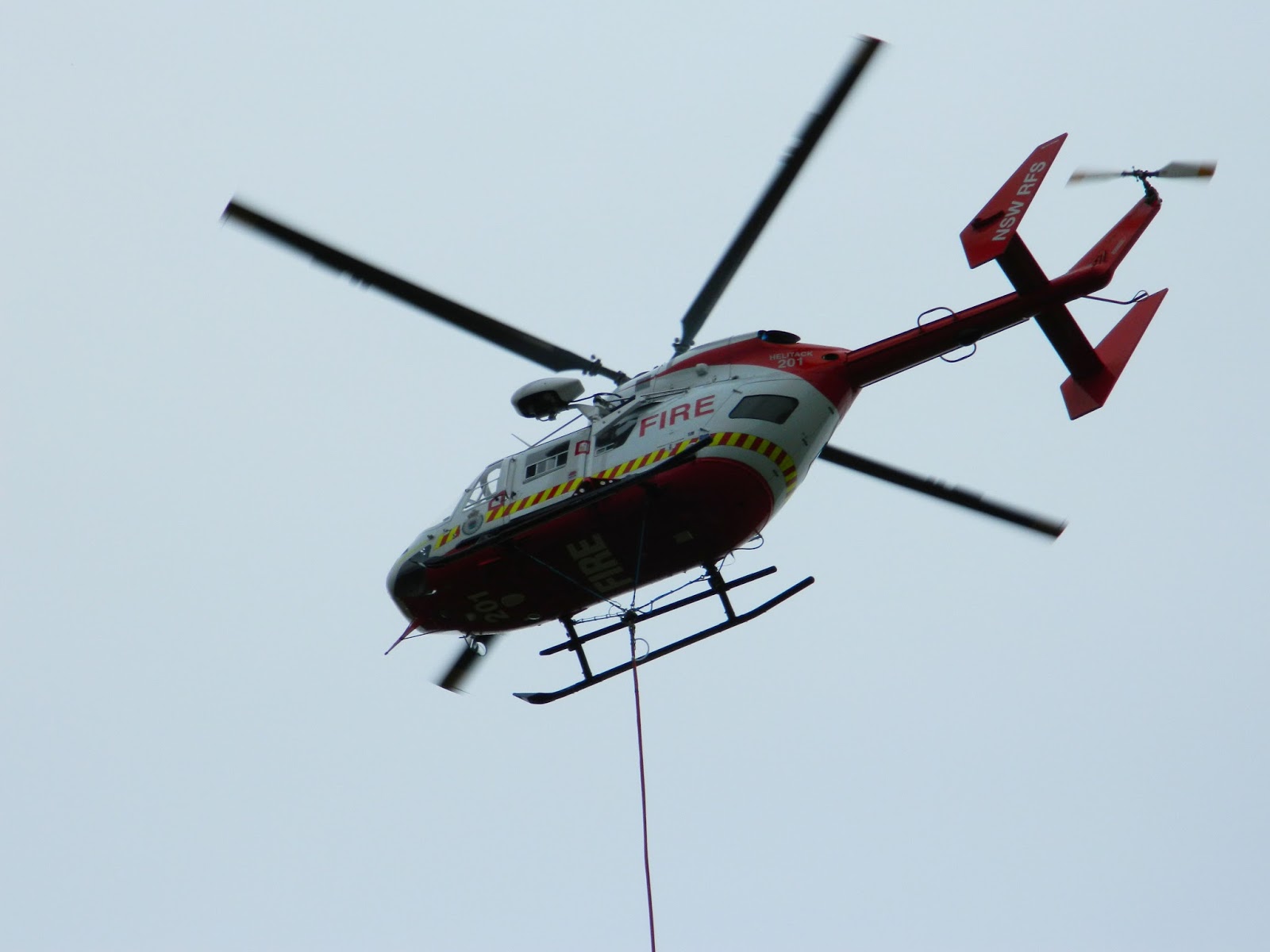
HELITAC 201 RFS HELICOPTER

Hello and welcome back.... Back-burning has commenced over the past few weeks in the lead up to this years fire season.

I had one of these back-burns last weekend in Faulconbridge which is roughly a suburb away from me. Apart from the usual firetrucks and personnel to maintain the fires progress, we were joined by RFS Helicopter 'Helitac 201',. and at times Helitac 270

The helicopters used Springwood Country Club (golf course) to refill from the spring fed dam near hole 9. (good place to get photos :))

FREQUENCIES

GRN (RFS Blue Mountains) = talk id 10037
Fireground 6 = 161.0375

I managed to get a few photos of Helitac 201 (see below), love this helicopter, such a amazing bird to watch.
Well done to the pilots who fly these incredible aircraft, starting around 8am and flying until 5pm, only stopping for fuel breaks....


VIDEO


VIDEO 2


#RFS
#Helitac
#Helitac 201
#Helicopter
#NSWRadio&Communications

Thursday, September 24, 2015

AWESOME SETUP

Hello and welcome back.... Love this, what an awesome setup... Found on Facebook.


Monday, September 7, 2015

CONTROL YOUR UNIDEN UBCD396 USING YOUR IPHONE

Hello and welcome back.... Found this really handy.

The other night, i wanted to listen to my scanner in bed. The problem is, i have a short UHF antenna attached to my Uniden UBCD396xt for GRN. You see, moving around the house, the radio often drops out and i lose channels, by the time the radio get signal, the info has gone....This also happens when strong wind is around.
By hooking my radio up the the main outside antenna this solves the problem of the dropouts.


THE SOLUTION

You can listen and control your Uniden UBCD396xt on your I-Device (IPad, IPhone and Ipod) thru your wireless connection in your home / office

HERE'S HOW

You need 3 things for this to work

1.Your Scanner connected to you computer running Freescan

2. Download the program 'Freescan for IOS' from the app store

3. Download and run program 'Scannercast'. This takes care of the audio side of things.


LETS GET STARTED

1. Firstly, plug you scanner into your computer and run the Freescan software program (if you don't have CLICK HERE )

** NOTE = Make sure you run the Freescan program as administrator. (right click program and choose 'run as administrator') or the program wont work properly later

Open Virtual Control

(Note = there is an option for 'Speech Synthesized tags' this is where the scanner / program reads out what channel the scanner is stopped on... its a bit hit and miss. You may want to go in and change some of your more popular ID Tags to something more simple otherwise its sounds like gibberish)

Click on Remote Control

Click Setup


Take note of the port No, you will need to enter this into the IOS app to gain access to your scanner.
The default port is 1300


 Now click on USERS
You can have the abillity to allow anyone or select certain users with a username and password (good for the office).

Then go back to Configuration & Control tab (see pic above) and click on "Start Server"... it should look like the pic below
If you get an error, it means that you did not run as administrator. Restart Freescan as Administrator (right click on program and select 'run as administrator')
Make a note of what address the program is 'Listening' on... If you look at the pic above its 10.0.0.80
you will need to input this into the IOS app later


You will now have to go into your firewall settings and let the audio through...

Go to control panel in your computer and click firewall  (see pic below)

Click 'Advance Settings'

Click on 'Inbound Rules'

A new windows will now pop up (wizard) called 'Rule Type'
Click on the Port tab and select next (see below)


Next, type the port number, remember, mine was port 1300, this is the default port number and should be ok to use but you can choose another if you want (see below)


Click next
The next page is the 'Action' page
click on 'Allow this Connection', then click next
This is the 'Profile page'
Make sure all 3 are ticked and click next
this will be the 'Name' page
Give your connection a name such as 'Freescan' then press 'Finish'


NOW FOR SOUND

I run my sound using a headphone to headphone lead from scanner into microphone in the computer.
Make sure the scanner is on about 5-7 volume.
plug one end into scanner and the other into the computer, you should now be able to hear your scanner through your computer speakers/headphones
(If you don't, check your soundcard setup and make sure input is set to microphone or 'Line In' is ticked)

Download the program Scannercast. CLICK HERE to download

Run software (should like like pic below)
Make a note of the server port, mine is 5700. (You will need this to set up IOS app)
Make sure sound input is selected to your input (mine is microphone)
Check bit rate (mine is set to highest - 48k bits)... if you set too low it will sound watery
Also, check 'Audio Only'

Now, click on advanced (see below)
Here, you have the option to select stereo input and to have yours stations logged (you can click none if you want)

Now click on 'Start Broadcast'

** NOTE = YOU SHOULD NOW HAVE WRITTEN DOWN 3 THINGS
1. Server Address (mine was 10.0.0.80) you will find this in the freescan program in the remote control setup.
2. Port Number = (mine was port number 1300) you will find this also in the remote control part of freescan
3. Audio port Number (mine was 5700) you will find this is the 'Scannercast' software setup

Now that you have the 3 main bits that you need, lets fire it up

Next Download IOS Freescan app (cost 0.99)  CLICK HERE

When finished, open app

Should look similar to the pic below

1. Change the server name if you want

2. Enter Server address (mine is 10.0.0.80)

3. Enter Port Number (mine was 1300)

4.User name and password only needed if you set this up in the Freescan remote settings earlier.

5. Audio enable, Select YES

6. Audio Port (mine is 5700)

Click 'CONNECT NOW'

THATS IT, Should be now working, their is a few second delay between the audio in computer to the App but thats just the processing part.

It takes a few seconds to act when you press a button on the app so be patient.

If you exit the program, next time you go into the app just click on New server 1 or whatever you named your setup.

NOTE... If you shut down your computer and go back the next day and it doesn't work, check that the server address hasn't changed.... mine was 10.0.0.10  before so make a note of that, the rest should stay the same.
If it has changed, when you start Freescan IOS App, just enter the new server address into the app before hitting 'Connect Now'

You can now listen and control your scanner around the house / office while connected to a outside antenna...

PLEASE, Don't forget to shout me a coffee (see link top right corner).. Any amount big or small is much appreciated and it keeps this site happening :)

Enjoy