Thursday, March 17, 2016

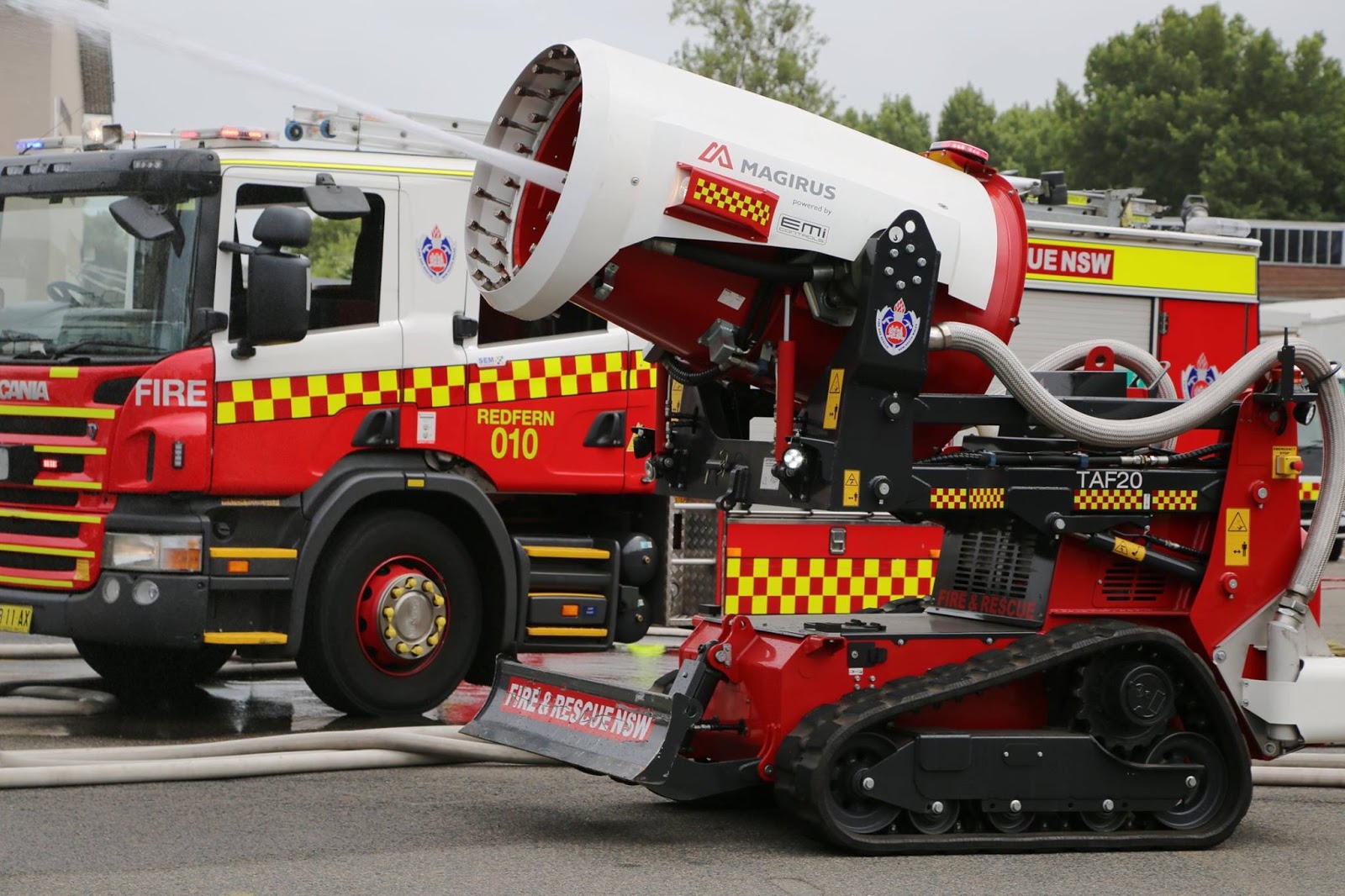
NSW FIRE & RESCUE - FIRE FIGHTING ROBOT

Hello and welcome back....This little beast can spray water at a distance of 90 meters... Pretty impressive.

From Fire and Rescue facebook page.


Whoever came up with this idea deserves a medal, what an excellent idea.

Put these Frequencies in your radio, can confirm, from listening to a car accident up the road from me, the Fire Brigade were using one of these back channels to cut someone out of a car using 'Jaws of Life'

use NFM if programming a Uniden Trunk scanner (eg UBCD396XT)

471.3500 = 501     Fireground           
471.5250 = 502     Fireground           
471.7000 = 503     Fireground          
471.7250 = 504     Fireground         
471.8500 = 505     Fireground         
425.2625 = 506     Fireground           
425.2875 = 507     Fireground           
425.3625 = 508     Fireground          
425.5000 = 509     Fireground         
425.5875 = 510     Fireground      
428.8750 = 511     Fireground         
428.9875 = 512     Fireground  


NAGOYA ANTENNAS FOR BAOFENG RADIOS

Hello and welcome back... for those who have a Baofeng radio, Nagoya have the antenna for you.

Mostly found on Ebay (make sure you put in the model number), these antennas are pretty good and worth the effort.


check out https://baofengtech.com/ for more info...

#Nagoya
#Baofeng
#NSWRadio&Communications
#NSW Radio & Communications

Don't forget to shout me a coffee (see link top right corner)... Any amount big or small is much appreciated and it keeps this site happening :)

Tuesday, March 8, 2016

FLEETSAT / FLTSATCOM FREQUENCIES

Hello and welcome back..... Fleetsat or Fltsatcom frequencies are a band of frequencies between 240mhz and 380mhz (NFM Mode) known as the military band, used by Australian & U.S military... Sometime you can hear clear chatter, other times its encrypted.
 In America it is very popular with lots of "Hits" with lots of chatter, weird call signs and various encrypted sounds.
Makes for some very interesting listening.

In NSW there have been instances where you are able to pick up chatter by just using a handheld whip antenna outside but having a home setup with outdoor antenna is better. Timing is critical, as when its day here, its night in the U.S but for night owls who don't sleep, well, the worlds your oyster..

This is a extensive list, not sure where i found them but i've had them for a while... Happy Listening

FLTSATCOM FREQUENCIES
SATELLITE A

Designator     Usage     Frequency

US Navy downlink     260.3500
US Navy downlink     260.4000
US Navy downlink     260.4250
US Navy downlink     260.4500
US Navy downlink     260.4750
US Navy downlink     260.5000
US Navy downlink     260.5250
US Navy downlink     260.5500
US Navy downlink     260.5750
US Navy downlink     260.6000
US Navy uplink     293.9500
USAF downlink     260.6250
USAF downlink     260.6500
USAF downlink     260.6750
USAF downlink     260.7000
USAF downlink     260.7250
USAF downlink     260.7500
USAF downlink     260.7750
USAF downlink     260.8000
USAF downlink     260.8250
USAF downlink     260.8500
Wideband downlink     260.3750


US Navy downlink     250.4500
US Navy downlink     251.9500
US Navy downlink     253.6500
US Navy downlink     255.3500
US Navy downlink     256.9500
US Navy downlink     258.4500
US Navy downlink     265.3500
US Navy downlink     266.8500
US Navy downlink     269.7500
USAF downlink     243.9450
USAF downlink     243.9550
USAF downlink     243.9600
USAF downlink     243.9650
USAF downlink     243.9700
USAF downlink     243.9750
USAF downlink     243.9800
USAF downlink     243.9850
USAF downlink     243.9900
USAF downlink     243.9950
USAF downlink     244.0000
USAF downlink     244.0100
Wideband downlink     260.3500
Wideband downlink     260.8500


SATELLITE B
Designator     Usage     Frequency

PACWEST     US Navy downlink     261.4500
PACWEST     US Navy downlink     261.5250
PACWEST     US Navy downlink     261.5500
PACWEST     US Navy downlink     261.5750
PACWEST     US Navy downlink     261.6000
PACWEST     US Navy downlink     261.6250
PACWEST     US Navy downlink     261.6500
PACWEST     US Navy downlink     261.6750
PACWEST     US Navy downlink     261.7000
PACWEST     USAF downlink     261.7250
PACWEST     USAF downlink     261.7500
PACWEST     USAF downlink     261.7750
PACWEST     USAF downlink     261.8000
PACWEST     USAF downlink     261.8250
PACWEST     USAF downlink     261.8500
PACWEST     USAF downlink     261.8750
PACWEST     USAF downlink     261.9000
PACWEST     USAF downlink     261.9250
PACWEST     USAF downlink     261.9500
PACWEST     wideband downlink     261.4750


US Navy downlink     250.5500
US Navy downlink     252.0500
US Navy downlink     253.7500
US Navy downlink     255.4500
US Navy downlink     257.0500
US Navy downlink     258.5500
US Navy downlink     265.4500
US Navy downlink     266.9500
US Navy downlink     268.3500
US Navy downlink     269.8500
USAF downlink     244.0450
USAF downlink     244.0550
USAF downlink     244.0600
USAF downlink     244.0650
USAF downlink     244.0700
USAF downlink     244.0750
USAF downlink     244.0800
USAF downlink     244.0850
USAF downlink     244.0900
USAF downlink     244.0950
USAF downlink     244.1000
USAF downlink     244.1100
Wideband downlink     261.9500
Wideband downlink     262.4500


SATELLITE C

Designator     Usage     Frequency

NORAD downlink     262.2000
US Navy downlink     262.0500
US Navy downlink     262.1000
US Navy downlink     262.1250
US Navy downlink     262.1500
US Navy downlink     262.1750
US Navy downlink     262.2000
US Navy downlink     262.2250
US Navy downlink     262.2500
US Navy downlink     262.2750
US Navy downlink     262.3000
USAF downlink     262.3250
USAF downlink     262.3500
USAF downlink     262.3750
USAF downlink     262.4000
USAF downlink     262.4250
USAF downlink     262.4500
USAF downlink     262.4750
USAF downlink     262.5000
USAF downlink     262.5250
USAF downlink     262.5500
Wideband downlink     262.0750
US Navy downlink     250.6500
US Navy downlink     252.1500
US Navy downlink     253.8500
US Navy downlink     255.5500
US Navy downlink     257.1500
US Navy downlink     258.6500
US Navy downlink     265.5500
US Navy downlink     267.0500
US Navy downlink     268.4500
US Navy downlink     269.9500
USAF downlink     244.1450
USAF downlink     244.1550
USAF downlink     244.1600
USAF downlink     244.1650
USAF downlink     244.1700
USAF downlink     244.1750
USAF downlink     244.1800
USAF downlink     244.1850
USAF downlink     244.1900
USAF downlink     244.1950
USAF downlink     244.2000
USAF downlink     244.2100
Wideband downlink     262.0500
Wideband downlink     262.5500


SATELLITE D

Designator     Usage     Frequency

S Navy Downlink     263.5500
US Navy Downlink     263.6000
US Navy Downlink     263.6250
US Navy Downlink     263.6500
US Navy Downlink     263.6750
US Navy Downlink     263.7000
US Navy Downlink     263.7250
US Navy Downlink     263.7500
US Navy Downlink     263.7750
US Navy Downlink     263.8000
USAF Downlink     263.8250
USAF Downlink     263.8500
USAF Downlink     263.8750
USAF Downlink     263.9000
USAF Downlink     263.9250
USAF Downlink     263.9500
USAF Downlink     263.9750
USAF Downlink     264.0000
USAF Downlink     264.0250
USAF Downlink     264.0500
Wideband Downlink     263.5750
Hurricane Hunters Downlink     243.8750
US Navy Downlink     250.3500
US Navy Downlink     251.8500
US Navy Downlink     253.5500
US Navy Downlink     255.2500
US Navy Downlink     256.8500
US Navy Downlink     258.3500
US Navy Downlink     265.2500
 US Navy Downlink     266.7500
US Navy Downlink     268.1500
US Navy Downlink     269.6500
USAF Downlink     243.8450
USAF Downlink     243.8550
USAF Downlink     243.8600
USAF Downlink     243.8650
USAF Downlink     243.8700
USAF Downlink     243.8750
USAF Downlink     243.8800
USAF Downlink     243.8850
USAF Downlink     243.8900
USAF Downlink     243.8950
USAF Downlink     243.9000
USAF Downlink     243.9100
Wideband Downlink     263.5500
Wideband Downlink     264.0500


CONUS SATELLITE

Navy 25 KHz Channels
251.850
253.550
253.850
255.550
256.850

DOD 25 KHz Channels (Dept of Defence)
260.375
260.475
261.575
261.675
261.775
261.875
263.225
263.575
263.675


Gapfiller UFO 5 KHz Channels
248.845
248.855
248.865
248.875
248.885
248.895
248.905
248.915
248.925
248.935
248.945
248.955
248.965


255.550 - FLTSAT-8 LANT
 256.850 - FLTSAT-8 LANT


PLEASE, Don't forget to shout me a coffee (see link top right corner)... Any amount big or small is much appreciated and it keeps this site happening :)


Monday, February 22, 2016

WENTWORTH FALLS (NSW) TOWER

Hello and welcome back.... Bit of a story to this one..


I would love this in my backyard but i don't think my neighbors would be very happy...

This tower is situated at Wentworth Falls NSW (Boddington Hill).

Many moons ago i worked at Katoomba doing delivery's and installs (TVs etc) and when i was in the neighborhood, i would park right under this tower and have lunch. You could walk right underneath this beast at one time and marvel at the huge guy ropes that held this tower in place.
By striking the base guy rope you could watch the ripple effect go all the way back to the top of the tower... well, it was interesting to me... haha
Sadly, after a while you had to leave because the RF energy would give you a wicked headache.
But it was fun. (and an amazing view)
This site is now gated off, haven't been back in years... fun while it lasted.


#Wentworth Falls
#Boddington Hill


PLEASE, Don't forget to shout me a coffee (see link top right corner)... Keeps this site happening :)


Friday, February 12, 2016

SDR (Software Defined Radio) RADIO

Hello and welcome back.... So, what is SDR Radio?, How much does it cost and what do i need to make it work?

SDR (Software Defined Radios or Software Radio) is probably one the cheapest way to get into radio scanning. (I'm going to start at the lower end of the scale). Normally, a radio scanner relies on the hardware (i.e the scanner itself) to receive and display the frequencies it receives. A SDR Radio uses computer software to do the work instead
You can listen to Shortwave, Amateur Radio, FM Radio, and even Aircraft band (listening, tracking etc) on a SDR Radio.

There is 3 parts to set up a SDR.

1 = TV Dongle
2 = Software (Computer possibly running X64 bit, 32 Bit is OK but can get glitchy at times depending on software), also make sure you have Microsoft Net Framework 4.6 or higher (Download Here)
3 = Antenna (an outdoor antenna would be perfect)

To start, you will need a small TV tuner dongle (see below), they sell on Ebay for around $20-50. The RTL-SDR (Realtek RTL2832U) is the most popular and best value for money (as shown below). You can also spend several hundreds of dollars to get better equipment but this is more to get you started.

Next thing i will say is to get rid of the crappy little antenna that came with your dongle, it wont do your SDR any justice.
Thirdly, don't install the software that came with your dongle... The idea is, that although the dongle is built for TV tuning, it also receives a huge bandwidth capable of receiving a whole lot more and with the right software, that is what SDR is all about.

2. SOFTWARE... The magic that make everything works.

There are 2 parts to the software

The DRIVER... To recognize your dongle

You can download the driver from HERE

Then follow the steps below (or Here)
  1. Plug in the RTL-SDR. (dongle)
  2. Run Zadig as administrator by right clicking it and choosing run as administrator.
  3. Go to Options -> List all devices and make sure it is checked.
  4. In the drop down box choose Bulk-In, Interface (Interface 0). This may also sometimes show up as something prefixed with “RTL28328U”. That choice is also valid.
  5. Make sure that WinUSB is selected as the target driver and click on Download Driver / Reinstall Driver.

If you get stuck, check out links below (the driver and info link)


The SOFTWARE... Receives the frequencies coming from your dongle.

The most popular (and easy to use) would be HDSDR software.. (see below) but the fun thing is, that if you don't like a particular software program, just change to another till one suits your needs.


Some other software thats available for SDR  (below)

SOFTWARE LINKS

http://zadig.akeo.ie/  (driver and information)

http://www.hdsdr.de/  (The most popular software of SDR)

http://airspy.com/download/  (Sdr Sharp)

http://fyngyrz.com/?p=2539#more-2539  (SdrDx - Windows and Mac)  http://fyngyrz.com/

http://www.sm5bsz.com/lir/sim1/sim1.htm#SDRMAX  (SdrMax) also  https://rz3dvp.ru/software

http://sdr-radio.com/Software  (Sdr-Radio)

http://microtelecom.it/perseus/software.html  (Sdr - Perseus)

http://www.winrad.org/  (Sdr - Winrad)

http://www.sdrapplications.it/ (Sdr - StudioOne)

http://genesisradio.com.au/GSDR/  (Sdr - Genesis)

http://www.rtl-sdr.com/   (Information, links)

http://sdr.osmocom.org/trac/wiki/rtl-sdr  (info - inc Linux)

https://sourceforge.net/projects/acarsdec/  (ACARS Decoder)

http://lz2hv.org/node/3  (Amateur radio)


As you can see, there is a plethora (i love that word) of software available (just google SDR Software) and prepare to be amazed...


ANTENNA

Any type of antenna is good for SDR but an outdoor antenna is best.
Antenna's like the Discone, a longwire (shortwave) or a multiband whip up a pole will work the best.
Inside antennas tend to pick up too much interference inc computers, air cond, led lights, etc


GETTING IT ALL TO WORK

Once you get your dongle, download the driver from the link above (Zardig) and run the software, also be prepared to plug your dongle into your computer. (problems? click here)
Next, fire up the software program and check settings so that your dongle is active and start the software program.
May take a bit of time and a bit of a learning curb but can be fun listening to some interesting frequencies.

What i have written here is just the tip of the iceberg, as you get more into SDR Radio, you can upgrade to a factory made SDR unit that is actually made for SDR Radio. (Lots to choose from here)


I'm not a huge user of SDR Radio and don't claim know everything about this form of radio. (please don't ask really technical questions because i simply don't know)...

I will leave comments section open in case i have missed something or you can add some more information on SDR Radio so others can benefit.

Spam will get the comments section closed..

Cheers


#SDR Radio
#sdr
#SdrRadio

PLEASE, Don't forget to shout me a coffee (see link top right corner)... Keeps this site happening :)


SHORTWAVE WEBSITE

Hello and welcome back... Been following this site for a little while and its very informative.

Called 'SWLing' its a interesting site that has various reviews, news, and giveaways from around the world regarding ShortWave Radio.

You can also subscribe to get up to date information from this site as well.

Well worth the visit...

Check the site out here http://swling.com/blog/


PLEASE, Don't forget to shout me a coffee (see link top right corner)... Keeps this site happening :)


Friday, February 5, 2016

MAKE YOUR OWN ANTENNA

Hello and welcome back.... Found this interesting.

How to build your own antenna that should look like the pic below..


You can find the Step by Step information at this site = http://www.balarad.net/

And / Or watch the video below...


PLEASE, Don't forget to shout me a coffee (see link top right corner)... Keeps this site happening :)

Cheers